

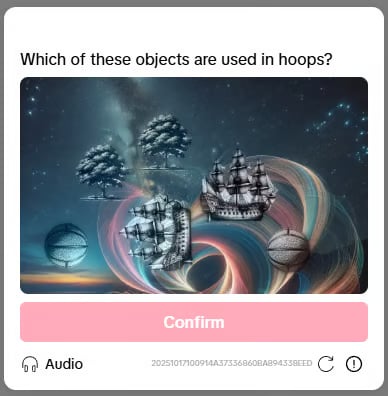
Example Tiktok 3D Select Object captcha
1. Create task
Request
POST https://api.omocaptcha.com/v2/createTask
| Parameter | Type | Required | Description |
|---|---|---|---|
clientKey | String | ✅ | Client account key |
task.type | String | ✅ | Tiktok3DSelectObjectWebTask |
task.imageBase64 | String | ✅ | Captcha image encoded in base64  |
task.widthView | Number | ✅ | Image width as displayed on the web page (not the original size) |
task.heightView | Number | ✅ | Image height as displayed on the web page (not the original size) |
task.question | String | ✅ | The captcha question (e.g. Which of these objects are used in hoops?) |
widthView and heightView are the rendered dimensions of the image on the page, not the original image size. Use the browser’s Inspect element tool to get the correct values.Response
Success:errorId = 0 and the taskId on success.
Failure:
errorId = 1 with an errorCode. See Error codes for details.
2. Get task result
Request
POST https://api.omocaptcha.com/v2/getTaskResult
Response
Success:errorId = 0 and status = ready. Read the result from solution:
pointA— coordinates of the first object (x, y), relative to thewidthView/heightViewyou sent.pointB— coordinates of the second object.
status = processing. Wait ~2 seconds and call getTaskResult again.
Failure:
errorId = 1 and status = fail.