> ## Documentation Index
> Fetch the complete documentation index at: https://docs.omocaptcha.com/llms.txt
> Use this file to discover all available pages before exploring further.
# ImageToTextTask
> Giải captcha dạng hình ảnh chuyển thành văn bản
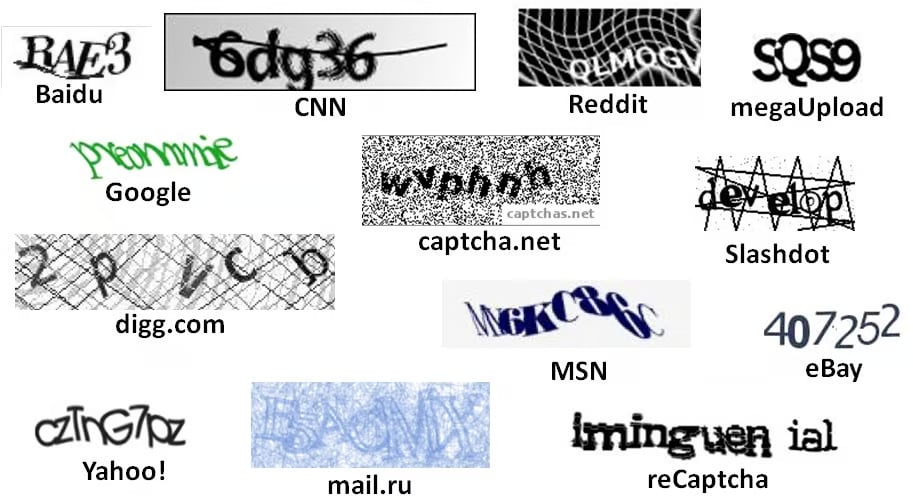
Captcha thông thường là một hình ảnh có chứa văn bản bị bóp méo nhưng con người có thể đọc được. Để giải quyết hình ảnh xác thực, người dùng phải nhập văn bản từ hình ảnh.
 ## 1. Tạo yêu cầu
### Request
```http theme={null}
POST https://api.omocaptcha.com/v2/createTask
Content-Type: application/json
```
#### Body Parameters
| Tham số | Kiểu | Bắt buộc | Mô tả |
| ------------------ | -------- | :------: | ---------------------------------- |
| `clientKey` | `String` | ✅ | Khóa tài khoản khách hàng |
| `task.type` | `String` | ✅ | Tên class dịch vụ captcha cần giải |
| `task.imageBase64` | `String` | ✅ | Hình ảnh được mã hóa base64 |
| `task.module` | `String` | ❌ | Tên loại captcha (không bắt buộc) |
```bash cURL theme={null}
curl -X POST https://api.omocaptcha.com/v2/createTask \
-H "Content-Type: application/json" \
-d '{
"clientKey": "OMO_API_KEY",
"task": {
"type": "ImageToTextTask",
"imageBase64": "BASE64_BODY_HERE",
"module": "module_1"
}
}'
```
```javascript Node.js theme={null}
const res = await fetch("https://api.omocaptcha.com/v2/createTask", {
method: "POST",
headers: { "Content-Type": "application/json" },
body: JSON.stringify({
clientKey: "OMO_API_KEY",
task: {
type: "ImageToTextTask",
imageBase64: "BASE64_BODY_HERE",
module: "module_1"
}
})
});
console.log(await res.json());
```
```python Python theme={null}
import requests
res = requests.post(
"https://api.omocaptcha.com/v2/createTask",
json={
"clientKey": "OMO_API_KEY",
"task": {
"type": "ImageToTextTask",
"imageBase64": "BASE64_BODY_HERE",
"module": "module_1"
}
}
)
print(res.json())
```
```php PHP theme={null}
"OMO_API_KEY",
"task" => [
"type" => "ImageToTextTask",
"imageBase64" => "BASE64_BODY_HERE",
"module" => "module_1"
]
]));
$response = curl_exec($ch);
echo $response;
```
### Response
```json Thành công theme={null}
{
"errorId": 0,
"taskId": "49f9f60a-c809-4af0-93c0-0409b72e67e0"
}
```
```json Thất bại theme={null}
{
"errorId": 1,
"errorCode": "",
"errorDescription": ""
}
```
* Máy chủ trả về `errorId = 0` và `taskId` → thành công
* Máy chủ trả về `errorId = 1` và `errorCode` → thất bại (tra [Bảng mã lỗi](/vi/api/bang-ma-loi))
## 2. Nhận kết quả yêu cầu
### Request
```http theme={null}
POST https://api.omocaptcha.com/v2/getTaskResult
Content-Type: application/json
```
```json theme={null}
{
"clientKey": "OMO_API_KEY",
"taskId": "49f9f60a-c809-4af0-93c0-0409b72e67e0"
}
```
### Response
```json Thành công theme={null}
{
"errorId": 0,
"status": "ready",
"solution": {
"text": "ABC"
}
}
```
```json Đang xử lý theme={null}
{
"status": "processing",
"errorId": 0,
"errorCode": "",
"errorDescription": ""
}
```
```json Thất bại theme={null}
{
"errorId": 1,
"errorCode": "ERROR_JOB_STATUS",
"errorDescription": "Job failed",
"status": "fail",
"solution": {}
}
```
* `errorId = 0` & `status = "ready"` → đọc kết quả trong `solution.text`
* `errorId = 0` & `status = "processing"` → yêu cầu đang được xử lý, **chờ 2 giây** rồi yêu cầu lại
* `errorId = 1` → thất bại, tra `errorCode` trong [Bảng mã lỗi](/vi/api/bang-ma-loi)
## 1. Tạo yêu cầu
### Request
```http theme={null}
POST https://api.omocaptcha.com/v2/createTask
Content-Type: application/json
```
#### Body Parameters
| Tham số | Kiểu | Bắt buộc | Mô tả |
| ------------------ | -------- | :------: | ---------------------------------- |
| `clientKey` | `String` | ✅ | Khóa tài khoản khách hàng |
| `task.type` | `String` | ✅ | Tên class dịch vụ captcha cần giải |
| `task.imageBase64` | `String` | ✅ | Hình ảnh được mã hóa base64 |
| `task.module` | `String` | ❌ | Tên loại captcha (không bắt buộc) |
```bash cURL theme={null}
curl -X POST https://api.omocaptcha.com/v2/createTask \
-H "Content-Type: application/json" \
-d '{
"clientKey": "OMO_API_KEY",
"task": {
"type": "ImageToTextTask",
"imageBase64": "BASE64_BODY_HERE",
"module": "module_1"
}
}'
```
```javascript Node.js theme={null}
const res = await fetch("https://api.omocaptcha.com/v2/createTask", {
method: "POST",
headers: { "Content-Type": "application/json" },
body: JSON.stringify({
clientKey: "OMO_API_KEY",
task: {
type: "ImageToTextTask",
imageBase64: "BASE64_BODY_HERE",
module: "module_1"
}
})
});
console.log(await res.json());
```
```python Python theme={null}
import requests
res = requests.post(
"https://api.omocaptcha.com/v2/createTask",
json={
"clientKey": "OMO_API_KEY",
"task": {
"type": "ImageToTextTask",
"imageBase64": "BASE64_BODY_HERE",
"module": "module_1"
}
}
)
print(res.json())
```
```php PHP theme={null}
"OMO_API_KEY",
"task" => [
"type" => "ImageToTextTask",
"imageBase64" => "BASE64_BODY_HERE",
"module" => "module_1"
]
]));
$response = curl_exec($ch);
echo $response;
```
### Response
```json Thành công theme={null}
{
"errorId": 0,
"taskId": "49f9f60a-c809-4af0-93c0-0409b72e67e0"
}
```
```json Thất bại theme={null}
{
"errorId": 1,
"errorCode": "",
"errorDescription": ""
}
```
* Máy chủ trả về `errorId = 0` và `taskId` → thành công
* Máy chủ trả về `errorId = 1` và `errorCode` → thất bại (tra [Bảng mã lỗi](/vi/api/bang-ma-loi))
## 2. Nhận kết quả yêu cầu
### Request
```http theme={null}
POST https://api.omocaptcha.com/v2/getTaskResult
Content-Type: application/json
```
```json theme={null}
{
"clientKey": "OMO_API_KEY",
"taskId": "49f9f60a-c809-4af0-93c0-0409b72e67e0"
}
```
### Response
```json Thành công theme={null}
{
"errorId": 0,
"status": "ready",
"solution": {
"text": "ABC"
}
}
```
```json Đang xử lý theme={null}
{
"status": "processing",
"errorId": 0,
"errorCode": "",
"errorDescription": ""
}
```
```json Thất bại theme={null}
{
"errorId": 1,
"errorCode": "ERROR_JOB_STATUS",
"errorDescription": "Job failed",
"status": "fail",
"solution": {}
}
```
* `errorId = 0` & `status = "ready"` → đọc kết quả trong `solution.text`
* `errorId = 0` & `status = "processing"` → yêu cầu đang được xử lý, **chờ 2 giây** rồi yêu cầu lại
* `errorId = 1` → thất bại, tra `errorCode` trong [Bảng mã lỗi](/vi/api/bang-ma-loi)