> ## Documentation Index
> Fetch the complete documentation index at: https://docs.omocaptcha.com/llms.txt
> Use this file to discover all available pages before exploring further.
# HcaptchaImageTask
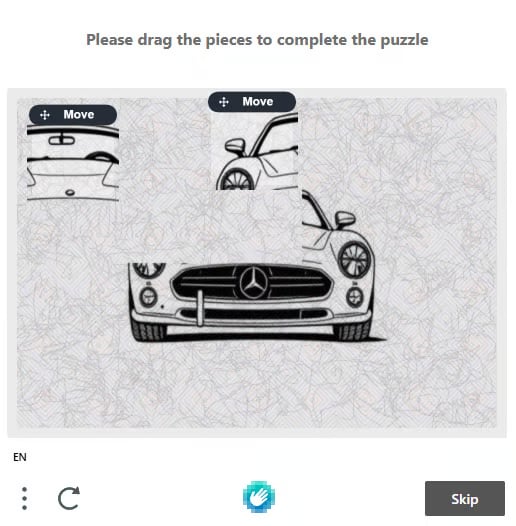
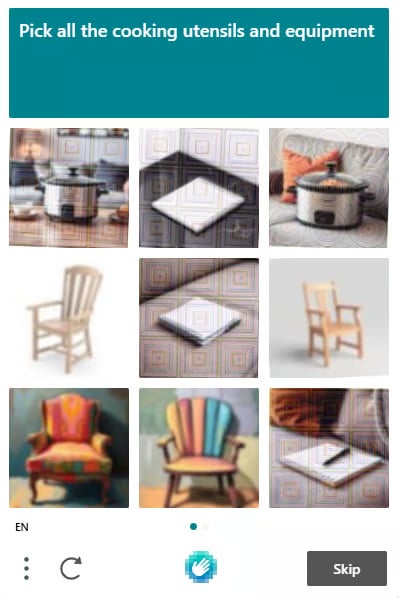
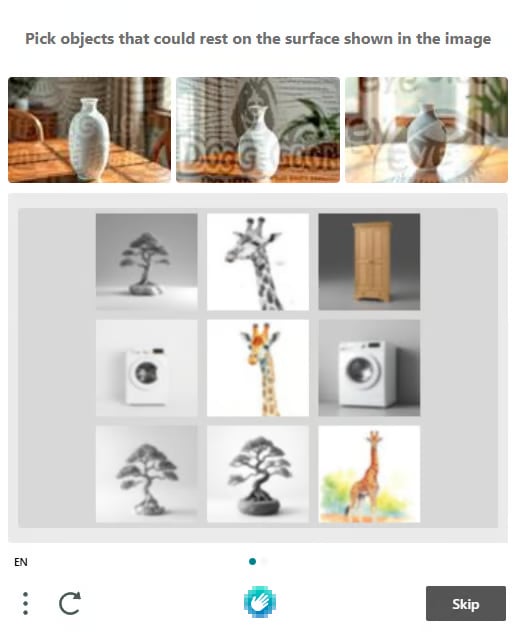
> Giải hCaptcha dạng hình ảnh (grid / canvas click / canvas drag)
hCaptcha còn được gọi là captcha **TÔI KHÔNG PHẢI ROBOT**, hCaptcha là một loại hình ảnh xác thực rất phổ biến.
 ## 1. Tạo yêu cầu
### Request
```http theme={null}
POST https://api.omocaptcha.com/v2/createTask
Content-Type: application/json
```
#### Body Parameters
| Tham số | Kiểu | Bắt buộc | Mô tả |
| ------------------- | -------------- | :------: | ---------------------------------------------------------------------------------------------------------------------------------- |
| `clientKey` | `String` | ✅ | Khóa tài khoản khách hàng |
| `task.type` | `String` | ✅ | Tên class dịch vụ captcha cần giải (`HcaptchaImageTask`) |
| `task.anchors` | array\ | ✅ | Mảng các hình ảnh captcha phần tiêu đề được mã hoá thành base64 (nếu có; nếu không, truyền mảng rỗng `[]`) |
| `task.queries` | array\ | ✅ | Mảng các hình ảnh captcha được mã hoá thành base64 (dạng **grid** truyền 9 ảnh theo thứ tự trên DOM, dạng **canvas** truyền 1 ảnh) |
| `task.question` | `String` | ✅ | Câu hỏi của thử thách captcha |
| `task.isScreenshot` | `Boolean` | ❌ | Đặt `true` nếu chỉ gửi 1 ảnh chụp màn hình duy nhất (chứa cả hình captcha và câu hỏi) |
Có thể gửi 1 ảnh chụp màn hình chứa cả hình captcha và câu hỏi — kèm cờ `isScreenshot: true` và bỏ qua `question`, `anchors`.
```bash cURL theme={null}
curl -X POST https://api.omocaptcha.com/v2/createTask \
-H "Content-Type: application/json" \
-d '{
"clientKey": "OMO_API_KEY",
"task": {
"type": "HcaptchaImageTask",
"anchors": ["base64_image_1", "base64_image_2"],
"queries": ["base64_image_1", "base64_image_2"],
"question": "Pick all the cooking utensils and equipment"
}
}'
```
```javascript Node.js theme={null}
const res = await fetch("https://api.omocaptcha.com/v2/createTask", {
method: "POST",
headers: { "Content-Type": "application/json" },
body: JSON.stringify({
clientKey: "OMO_API_KEY",
task: {
type: "HcaptchaImageTask",
anchors: ["base64_image_1", "base64_image_2"],
queries: ["base64_image_1", "base64_image_2"],
question: "Pick all the cooking utensils and equipment"
}
})
});
console.log(await res.json());
```
```python Python theme={null}
import requests
res = requests.post(
"https://api.omocaptcha.com/v2/createTask",
json={
"clientKey": "OMO_API_KEY",
"task": {
"type": "HcaptchaImageTask",
"anchors": ["base64_image_1", "base64_image_2"],
"queries": ["base64_image_1", "base64_image_2"],
"question": "Pick all the cooking utensils and equipment"
}
}
)
print(res.json())
```
```php PHP theme={null}
"OMO_API_KEY",
"task" => [
"type" => "HcaptchaImageTask",
"anchors" => ["base64_image_1", "base64_image_2"],
"queries" => ["base64_image_1", "base64_image_2"],
"question" => "Pick all the cooking utensils and equipment"
]
]));
echo curl_exec($ch);
```
Hoặc chỉ gửi **1 ảnh chụp màn hình** (chứa cả hình captcha lẫn câu hỏi):
```json theme={null}
{
"clientKey": "OMO_API_KEY",
"task": {
"type": "HcaptchaImageTask",
"queries": ["base64_image"],
"isScreenshot": true
}
}
```
### Response
```json Thành công theme={null}
{
"errorId": 0,
"taskId": "49f9f60a-c809-4af0-93c0-0409b72e67e0"
}
```
```json Thất bại theme={null}
{
"errorId": 1,
"errorCode": "",
"errorDescription": ""
}
```
* `errorId = 0` và `taskId` → thành công
* `errorId = 1` và `errorCode` → thất bại (tra [Bảng mã lỗi](/vi/api/bang-ma-loi))
## 2. Nhận kết quả yêu cầu
### Request
```http theme={null}
POST https://api.omocaptcha.com/v2/getTaskResult
Content-Type: application/json
```
```json theme={null}
{
"clientKey": "OMO_API_KEY",
"taskId": "49f9f60a-c809-4af0-93c0-0409b72e67e0"
}
```
Tuỳ vào dạng thử thách, `solution` sẽ trả về theo một trong ba định dạng dưới đây.
### 2a. Kết quả dạng Grid
```json Thành công theme={null}
{
"errorId": 0,
"errorCode": "",
"errorDescription": "",
"status": "ready",
"solution": {
"objects": [1, 3, 8]
}
}
```
```json Đang xử lý theme={null}
{
"status": "processing",
"errorId": 0,
"errorCode": "",
"errorDescription": ""
}
```
```json Thất bại theme={null}
{
"errorId": 1,
"errorCode": "ERROR_JOB_STATUS",
"errorDescription": "Job failed",
"status": "fail",
"solution": {}
}
```
* `solution.objects` → mảng chỉ số các ô cần nhấp vào (từ `0` hoặc `1` tuỳ layout, theo thứ tự DOM).
### 2b. Kết quả dạng click canvas
```json Thành công theme={null}
{
"errorId": 0,
"errorCode": "",
"errorDescription": "",
"status": "ready",
"solution": {
"type": "click",
"coords": [
[398, 347]
]
}
}
```
```json Đang xử lý theme={null}
{
"status": "processing",
"errorId": 0,
"errorCode": "",
"errorDescription": ""
}
```
```json Thất bại theme={null}
{
"errorId": 1,
"errorCode": "ERROR_JOB_STATUS",
"errorDescription": "Job failed",
"status": "fail",
"solution": {}
}
```
* `solution.type = "click"` → mỗi phần tử trong `coords` là một cặp `[x, y]` cần nhấp trên canvas.
### 2c. Kết quả dạng kéo miếng ghép canvas
```json Thành công theme={null}
{
"errorId": 0,
"errorCode": "",
"errorDescription": "",
"status": "ready",
"solution": {
"type": "drag",
"box": [
{ "start": [446, 200], "end": [100, 224] },
{ "start": [455, 300], "end": [139, 190] }
]
}
}
```
```json Đang xử lý theme={null}
{
"status": "processing",
"errorId": 0,
"errorCode": "",
"errorDescription": ""
}
```
```json Thất bại theme={null}
{
"errorId": 1,
"errorCode": "ERROR_JOB_STATUS",
"errorDescription": "Job failed",
"status": "fail",
"solution": {}
}
```
* `solution.type = "drag"` → mỗi phần tử trong `box` gồm điểm `start` `[x, y]` và điểm `end` `[x, y]`, mô phỏng thao tác kéo miếng ghép từ `start` đến `end`.
Nhớ chờ **2 giây** giữa các lần gọi `getTaskResult` khi `status = "processing"`.
## 1. Tạo yêu cầu
### Request
```http theme={null}
POST https://api.omocaptcha.com/v2/createTask
Content-Type: application/json
```
#### Body Parameters
| Tham số | Kiểu | Bắt buộc | Mô tả |
| ------------------- | -------------- | :------: | ---------------------------------------------------------------------------------------------------------------------------------- |
| `clientKey` | `String` | ✅ | Khóa tài khoản khách hàng |
| `task.type` | `String` | ✅ | Tên class dịch vụ captcha cần giải (`HcaptchaImageTask`) |
| `task.anchors` | array\ | ✅ | Mảng các hình ảnh captcha phần tiêu đề được mã hoá thành base64 (nếu có; nếu không, truyền mảng rỗng `[]`) |
| `task.queries` | array\ | ✅ | Mảng các hình ảnh captcha được mã hoá thành base64 (dạng **grid** truyền 9 ảnh theo thứ tự trên DOM, dạng **canvas** truyền 1 ảnh) |
| `task.question` | `String` | ✅ | Câu hỏi của thử thách captcha |
| `task.isScreenshot` | `Boolean` | ❌ | Đặt `true` nếu chỉ gửi 1 ảnh chụp màn hình duy nhất (chứa cả hình captcha và câu hỏi) |
Có thể gửi 1 ảnh chụp màn hình chứa cả hình captcha và câu hỏi — kèm cờ `isScreenshot: true` và bỏ qua `question`, `anchors`.
```bash cURL theme={null}
curl -X POST https://api.omocaptcha.com/v2/createTask \
-H "Content-Type: application/json" \
-d '{
"clientKey": "OMO_API_KEY",
"task": {
"type": "HcaptchaImageTask",
"anchors": ["base64_image_1", "base64_image_2"],
"queries": ["base64_image_1", "base64_image_2"],
"question": "Pick all the cooking utensils and equipment"
}
}'
```
```javascript Node.js theme={null}
const res = await fetch("https://api.omocaptcha.com/v2/createTask", {
method: "POST",
headers: { "Content-Type": "application/json" },
body: JSON.stringify({
clientKey: "OMO_API_KEY",
task: {
type: "HcaptchaImageTask",
anchors: ["base64_image_1", "base64_image_2"],
queries: ["base64_image_1", "base64_image_2"],
question: "Pick all the cooking utensils and equipment"
}
})
});
console.log(await res.json());
```
```python Python theme={null}
import requests
res = requests.post(
"https://api.omocaptcha.com/v2/createTask",
json={
"clientKey": "OMO_API_KEY",
"task": {
"type": "HcaptchaImageTask",
"anchors": ["base64_image_1", "base64_image_2"],
"queries": ["base64_image_1", "base64_image_2"],
"question": "Pick all the cooking utensils and equipment"
}
}
)
print(res.json())
```
```php PHP theme={null}
"OMO_API_KEY",
"task" => [
"type" => "HcaptchaImageTask",
"anchors" => ["base64_image_1", "base64_image_2"],
"queries" => ["base64_image_1", "base64_image_2"],
"question" => "Pick all the cooking utensils and equipment"
]
]));
echo curl_exec($ch);
```
Hoặc chỉ gửi **1 ảnh chụp màn hình** (chứa cả hình captcha lẫn câu hỏi):
```json theme={null}
{
"clientKey": "OMO_API_KEY",
"task": {
"type": "HcaptchaImageTask",
"queries": ["base64_image"],
"isScreenshot": true
}
}
```
### Response
```json Thành công theme={null}
{
"errorId": 0,
"taskId": "49f9f60a-c809-4af0-93c0-0409b72e67e0"
}
```
```json Thất bại theme={null}
{
"errorId": 1,
"errorCode": "",
"errorDescription": ""
}
```
* `errorId = 0` và `taskId` → thành công
* `errorId = 1` và `errorCode` → thất bại (tra [Bảng mã lỗi](/vi/api/bang-ma-loi))
## 2. Nhận kết quả yêu cầu
### Request
```http theme={null}
POST https://api.omocaptcha.com/v2/getTaskResult
Content-Type: application/json
```
```json theme={null}
{
"clientKey": "OMO_API_KEY",
"taskId": "49f9f60a-c809-4af0-93c0-0409b72e67e0"
}
```
Tuỳ vào dạng thử thách, `solution` sẽ trả về theo một trong ba định dạng dưới đây.
### 2a. Kết quả dạng Grid
```json Thành công theme={null}
{
"errorId": 0,
"errorCode": "",
"errorDescription": "",
"status": "ready",
"solution": {
"objects": [1, 3, 8]
}
}
```
```json Đang xử lý theme={null}
{
"status": "processing",
"errorId": 0,
"errorCode": "",
"errorDescription": ""
}
```
```json Thất bại theme={null}
{
"errorId": 1,
"errorCode": "ERROR_JOB_STATUS",
"errorDescription": "Job failed",
"status": "fail",
"solution": {}
}
```
* `solution.objects` → mảng chỉ số các ô cần nhấp vào (từ `0` hoặc `1` tuỳ layout, theo thứ tự DOM).
### 2b. Kết quả dạng click canvas
```json Thành công theme={null}
{
"errorId": 0,
"errorCode": "",
"errorDescription": "",
"status": "ready",
"solution": {
"type": "click",
"coords": [
[398, 347]
]
}
}
```
```json Đang xử lý theme={null}
{
"status": "processing",
"errorId": 0,
"errorCode": "",
"errorDescription": ""
}
```
```json Thất bại theme={null}
{
"errorId": 1,
"errorCode": "ERROR_JOB_STATUS",
"errorDescription": "Job failed",
"status": "fail",
"solution": {}
}
```
* `solution.type = "click"` → mỗi phần tử trong `coords` là một cặp `[x, y]` cần nhấp trên canvas.
### 2c. Kết quả dạng kéo miếng ghép canvas
```json Thành công theme={null}
{
"errorId": 0,
"errorCode": "",
"errorDescription": "",
"status": "ready",
"solution": {
"type": "drag",
"box": [
{ "start": [446, 200], "end": [100, 224] },
{ "start": [455, 300], "end": [139, 190] }
]
}
}
```
```json Đang xử lý theme={null}
{
"status": "processing",
"errorId": 0,
"errorCode": "",
"errorDescription": ""
}
```
```json Thất bại theme={null}
{
"errorId": 1,
"errorCode": "ERROR_JOB_STATUS",
"errorDescription": "Job failed",
"status": "fail",
"solution": {}
}
```
* `solution.type = "drag"` → mỗi phần tử trong `box` gồm điểm `start` `[x, y]` và điểm `end` `[x, y]`, mô phỏng thao tác kéo miếng ghép từ `start` đến `end`.
Nhớ chờ **2 giây** giữa các lần gọi `getTaskResult` khi `status = "processing"`.