> ## Documentation Index
> Fetch the complete documentation index at: https://docs.omocaptcha.com/llms.txt
> Use this file to discover all available pages before exploring further.
# HcaptchaImageTask
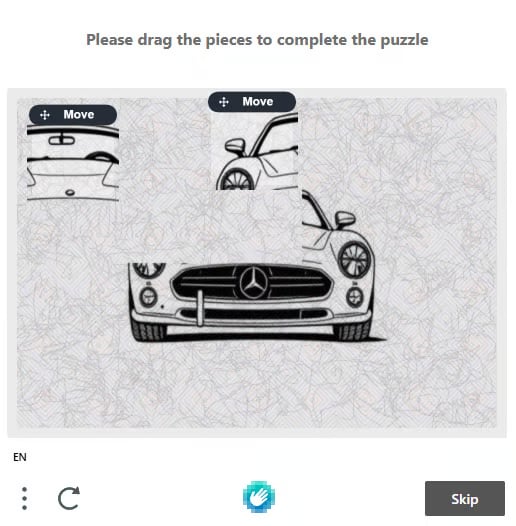
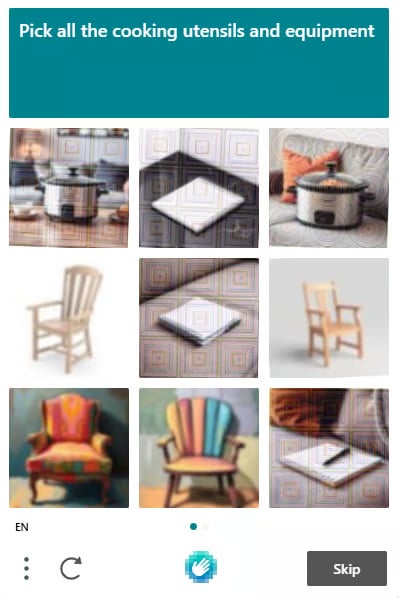
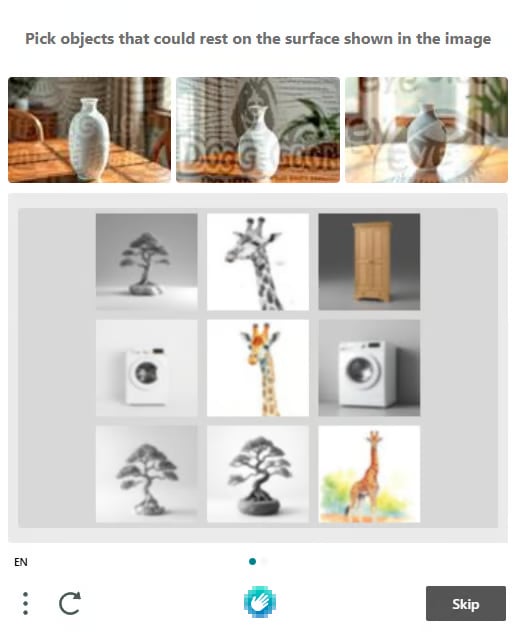
> Solve hCaptcha image challenges (grid / canvas click / canvas drag)
hCaptcha — also known as the **I AM NOT A ROBOT** captcha — is one of the most common image-based verification systems.
 ## 1. Create task
### Request
```http theme={null}
POST https://api.omocaptcha.com/v2/createTask
Content-Type: application/json
```
#### Body Parameters
| Parameter | Type | Required | Description |
| ------------------- | -------------- | :------: | -------------------------------------------------------------------------------------------------------------- |
| `clientKey` | `String` | ✅ | Your client API key |
| `task.type` | `String` | ✅ | Captcha service class name (`HcaptchaImageTask`) |
| `task.anchors` | array\ | ✅ | Array of base64-encoded anchor (header) images (pass `[]` if none) |
| `task.queries` | array\ | ✅ | Array of base64-encoded challenge images (for **grid**: 9 images in DOM order; for **canvas**: a single image) |
| `task.question` | `String` | ✅ | The challenge question text |
| `task.isScreenshot` | `Boolean` | ❌ | Set to `true` when sending a single full screenshot (containing both the question and the challenge) |
You can also send a single screenshot that contains both the challenge images and the question — set `isScreenshot: true` and omit `question` / `anchors`.
```bash cURL theme={null}
curl -X POST https://api.omocaptcha.com/v2/createTask \
-H "Content-Type: application/json" \
-d '{
"clientKey": "OMO_API_KEY",
"task": {
"type": "HcaptchaImageTask",
"anchors": ["base64_image_1", "base64_image_2"],
"queries": ["base64_image_1", "base64_image_2"],
"question": "Pick all the cooking utensils and equipment"
}
}'
```
```javascript Node.js theme={null}
const res = await fetch("https://api.omocaptcha.com/v2/createTask", {
method: "POST",
headers: { "Content-Type": "application/json" },
body: JSON.stringify({
clientKey: "OMO_API_KEY",
task: {
type: "HcaptchaImageTask",
anchors: ["base64_image_1", "base64_image_2"],
queries: ["base64_image_1", "base64_image_2"],
question: "Pick all the cooking utensils and equipment"
}
})
});
console.log(await res.json());
```
```python Python theme={null}
import requests
res = requests.post(
"https://api.omocaptcha.com/v2/createTask",
json={
"clientKey": "OMO_API_KEY",
"task": {
"type": "HcaptchaImageTask",
"anchors": ["base64_image_1", "base64_image_2"],
"queries": ["base64_image_1", "base64_image_2"],
"question": "Pick all the cooking utensils and equipment"
}
}
)
print(res.json())
```
```php PHP theme={null}
"OMO_API_KEY",
"task" => [
"type" => "HcaptchaImageTask",
"anchors" => ["base64_image_1", "base64_image_2"],
"queries" => ["base64_image_1", "base64_image_2"],
"question" => "Pick all the cooking utensils and equipment"
]
]));
echo curl_exec($ch);
```
Or send a single **screenshot** containing both the challenge and the question:
```json theme={null}
{
"clientKey": "OMO_API_KEY",
"task": {
"type": "HcaptchaImageTask",
"queries": ["base64_image"],
"isScreenshot": true
}
}
```
### Response
```json Success theme={null}
{
"errorId": 0,
"taskId": "49f9f60a-c809-4af0-93c0-0409b72e67e0"
}
```
```json Failure theme={null}
{
"errorId": 1,
"errorCode": "",
"errorDescription": ""
}
```
* `errorId = 0` and `taskId` → success
* `errorId = 1` and `errorCode` → failure (see [Error Codes](/en/api/error-codes))
## 2. Get task result
### Request
```http theme={null}
POST https://api.omocaptcha.com/v2/getTaskResult
Content-Type: application/json
```
```json theme={null}
{
"clientKey": "OMO_API_KEY",
"taskId": "49f9f60a-c809-4af0-93c0-0409b72e67e0"
}
```
Depending on the challenge variant, `solution` is returned in one of the three formats below.
### 2a. Grid result
```json Success theme={null}
{
"errorId": 0,
"errorCode": "",
"errorDescription": "",
"status": "ready",
"solution": {
"objects": [1, 3, 8]
}
}
```
```json Processing theme={null}
{
"status": "processing",
"errorId": 0,
"errorCode": "",
"errorDescription": ""
}
```
```json Failure theme={null}
{
"errorId": 1,
"errorCode": "ERROR_JOB_STATUS",
"errorDescription": "Job failed",
"status": "fail",
"solution": {}
}
```
* `solution.objects` → indices of the grid cells to click (DOM order).
### 2b. Canvas click result
```json Success theme={null}
{
"errorId": 0,
"errorCode": "",
"errorDescription": "",
"status": "ready",
"solution": {
"type": "click",
"coords": [
[398, 347]
]
}
}
```
```json Processing theme={null}
{
"status": "processing",
"errorId": 0,
"errorCode": "",
"errorDescription": ""
}
```
```json Failure theme={null}
{
"errorId": 1,
"errorCode": "ERROR_JOB_STATUS",
"errorDescription": "Job failed",
"status": "fail",
"solution": {}
}
```
* `solution.type = "click"` → each entry in `coords` is an `[x, y]` point to click on the canvas.
### 2c. Canvas drag result
```json Success theme={null}
{
"errorId": 0,
"errorCode": "",
"errorDescription": "",
"status": "ready",
"solution": {
"type": "drag",
"box": [
{ "start": [446, 200], "end": [100, 224] },
{ "start": [455, 300], "end": [139, 190] }
]
}
}
```
```json Processing theme={null}
{
"status": "processing",
"errorId": 0,
"errorCode": "",
"errorDescription": ""
}
```
```json Failure theme={null}
{
"errorId": 1,
"errorCode": "ERROR_JOB_STATUS",
"errorDescription": "Job failed",
"status": "fail",
"solution": {}
}
```
* `solution.type = "drag"` → each entry in `box` has a `start` `[x, y]` and an `end` `[x, y]`, simulating dragging a puzzle piece from `start` to `end`.
Wait **2 seconds** between `getTaskResult` polls while `status = "processing"`.
## 1. Create task
### Request
```http theme={null}
POST https://api.omocaptcha.com/v2/createTask
Content-Type: application/json
```
#### Body Parameters
| Parameter | Type | Required | Description |
| ------------------- | -------------- | :------: | -------------------------------------------------------------------------------------------------------------- |
| `clientKey` | `String` | ✅ | Your client API key |
| `task.type` | `String` | ✅ | Captcha service class name (`HcaptchaImageTask`) |
| `task.anchors` | array\ | ✅ | Array of base64-encoded anchor (header) images (pass `[]` if none) |
| `task.queries` | array\ | ✅ | Array of base64-encoded challenge images (for **grid**: 9 images in DOM order; for **canvas**: a single image) |
| `task.question` | `String` | ✅ | The challenge question text |
| `task.isScreenshot` | `Boolean` | ❌ | Set to `true` when sending a single full screenshot (containing both the question and the challenge) |
You can also send a single screenshot that contains both the challenge images and the question — set `isScreenshot: true` and omit `question` / `anchors`.
```bash cURL theme={null}
curl -X POST https://api.omocaptcha.com/v2/createTask \
-H "Content-Type: application/json" \
-d '{
"clientKey": "OMO_API_KEY",
"task": {
"type": "HcaptchaImageTask",
"anchors": ["base64_image_1", "base64_image_2"],
"queries": ["base64_image_1", "base64_image_2"],
"question": "Pick all the cooking utensils and equipment"
}
}'
```
```javascript Node.js theme={null}
const res = await fetch("https://api.omocaptcha.com/v2/createTask", {
method: "POST",
headers: { "Content-Type": "application/json" },
body: JSON.stringify({
clientKey: "OMO_API_KEY",
task: {
type: "HcaptchaImageTask",
anchors: ["base64_image_1", "base64_image_2"],
queries: ["base64_image_1", "base64_image_2"],
question: "Pick all the cooking utensils and equipment"
}
})
});
console.log(await res.json());
```
```python Python theme={null}
import requests
res = requests.post(
"https://api.omocaptcha.com/v2/createTask",
json={
"clientKey": "OMO_API_KEY",
"task": {
"type": "HcaptchaImageTask",
"anchors": ["base64_image_1", "base64_image_2"],
"queries": ["base64_image_1", "base64_image_2"],
"question": "Pick all the cooking utensils and equipment"
}
}
)
print(res.json())
```
```php PHP theme={null}
"OMO_API_KEY",
"task" => [
"type" => "HcaptchaImageTask",
"anchors" => ["base64_image_1", "base64_image_2"],
"queries" => ["base64_image_1", "base64_image_2"],
"question" => "Pick all the cooking utensils and equipment"
]
]));
echo curl_exec($ch);
```
Or send a single **screenshot** containing both the challenge and the question:
```json theme={null}
{
"clientKey": "OMO_API_KEY",
"task": {
"type": "HcaptchaImageTask",
"queries": ["base64_image"],
"isScreenshot": true
}
}
```
### Response
```json Success theme={null}
{
"errorId": 0,
"taskId": "49f9f60a-c809-4af0-93c0-0409b72e67e0"
}
```
```json Failure theme={null}
{
"errorId": 1,
"errorCode": "",
"errorDescription": ""
}
```
* `errorId = 0` and `taskId` → success
* `errorId = 1` and `errorCode` → failure (see [Error Codes](/en/api/error-codes))
## 2. Get task result
### Request
```http theme={null}
POST https://api.omocaptcha.com/v2/getTaskResult
Content-Type: application/json
```
```json theme={null}
{
"clientKey": "OMO_API_KEY",
"taskId": "49f9f60a-c809-4af0-93c0-0409b72e67e0"
}
```
Depending on the challenge variant, `solution` is returned in one of the three formats below.
### 2a. Grid result
```json Success theme={null}
{
"errorId": 0,
"errorCode": "",
"errorDescription": "",
"status": "ready",
"solution": {
"objects": [1, 3, 8]
}
}
```
```json Processing theme={null}
{
"status": "processing",
"errorId": 0,
"errorCode": "",
"errorDescription": ""
}
```
```json Failure theme={null}
{
"errorId": 1,
"errorCode": "ERROR_JOB_STATUS",
"errorDescription": "Job failed",
"status": "fail",
"solution": {}
}
```
* `solution.objects` → indices of the grid cells to click (DOM order).
### 2b. Canvas click result
```json Success theme={null}
{
"errorId": 0,
"errorCode": "",
"errorDescription": "",
"status": "ready",
"solution": {
"type": "click",
"coords": [
[398, 347]
]
}
}
```
```json Processing theme={null}
{
"status": "processing",
"errorId": 0,
"errorCode": "",
"errorDescription": ""
}
```
```json Failure theme={null}
{
"errorId": 1,
"errorCode": "ERROR_JOB_STATUS",
"errorDescription": "Job failed",
"status": "fail",
"solution": {}
}
```
* `solution.type = "click"` → each entry in `coords` is an `[x, y]` point to click on the canvas.
### 2c. Canvas drag result
```json Success theme={null}
{
"errorId": 0,
"errorCode": "",
"errorDescription": "",
"status": "ready",
"solution": {
"type": "drag",
"box": [
{ "start": [446, 200], "end": [100, 224] },
{ "start": [455, 300], "end": [139, 190] }
]
}
}
```
```json Processing theme={null}
{
"status": "processing",
"errorId": 0,
"errorCode": "",
"errorDescription": ""
}
```
```json Failure theme={null}
{
"errorId": 1,
"errorCode": "ERROR_JOB_STATUS",
"errorDescription": "Job failed",
"status": "fail",
"solution": {}
}
```
* `solution.type = "drag"` → each entry in `box` has a `start` `[x, y]` and an `end` `[x, y]`, simulating dragging a puzzle piece from `start` to `end`.
Wait **2 seconds** between `getTaskResult` polls while `status = "processing"`.